Security architecture
Your server cannot see, spoof or sniff another customer's.
CACloud takes a defence-in-depth approach: the physical equipment, the cloud resources and your data are each protected by their own controls. Isolation between customers is enforced in the hypervisor, and every action taken on your account is logged.
- 3Facilities, all in Canada
- 2Cities: Toronto and Vancouver
- SOC 2 Type IIReport held
- 1-866-821-8355Phone
- Private VLAN per customer
- 4 firewall layers
- IPS/IDS site-wide
- Audit log kept
Defence in depth
No single control is trusted to do the whole job. The building, the network, the hypervisor, the virtual machine and the management portal each have their own protection, so a failure in one layer is caught by the next.
The platform is built on one premise: the virtual machines and the hypervisor operating system stay completely separate. Services that share core operating-system components between the host and its guests have a larger shared surface; keeping them apart is what makes the isolation below possible.
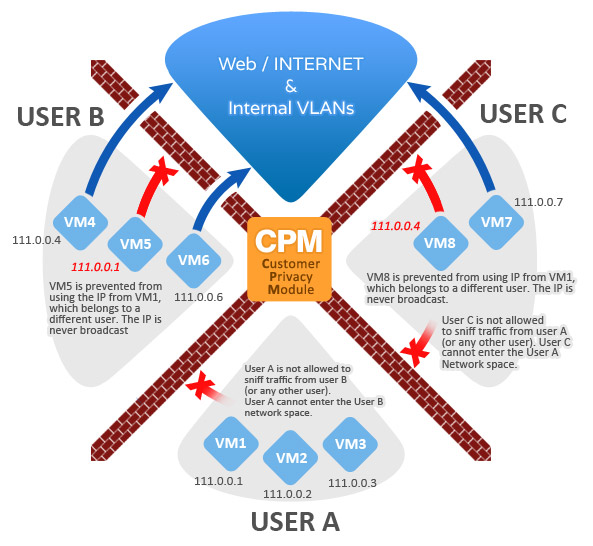
Network isolation: one customer, one network
Before any of that, traffic reaches us through Cloudflare Magic Transit, which absorbs network-layer DDoS attacks at Cloudflare's edge before they touch our network. It is included with every plan on every line, at no extra charge and with no traffic threshold to buy past.
Every server sits inside its own customer's network segment, enforced at the hypervisor. That isolation has three jobs:
- Private VLANs. Each customer gets their own section of the cloud network. You get the isolation of a private VLAN without running one yourself.
- Secure VLAN sharing. When several of your virtual machines share a VLAN, the platform manages the VLANs and the IP addresses assigned to each machine.
- Hypervisor firewall. Anti-spoofing and anti-sniffing rules built into the hypervisor stop one virtual machine from talking to, or reading traffic from, another customer's machine.
Intrusion detection and prevention
The network perimeter includes intrusion detection and prevention devices for the whole data centre. They inspect traffic entering and leaving the site for attack patterns and block what matches. This protection covers every server on the site and is on by default; there is nothing to enable.
Customers who need more can add web application protection and other security servers in front of their own machines.
The four firewall layers
Traffic to your server crosses four firewalls: one on the network, two in the hypervisor, and one inside your own machine. You control the last one. All four are part of what you already pay for; CACloud does not sell a firewall appliance.
| Layer | Where it runs | What it does | Configured by |
|---|---|---|---|
| 1. Network and infrastructure | Firewalling built into our own network gear in each facility. | Screens traffic before it reaches any host. Part of the infrastructure every customer sits behind, not something you buy. | CACloud |
| 2. Hypervisor | The firewalling and security features built into the hypervisor platform. | Keeps each virtual machine, and its data, isolated from the others on the same host. | CACloud |
| 3. Per-customer network isolation | Packet filtering built into each hypervisor, managed by CACloud. | Anti-spoofing and anti-sniffing. Inspects every packet entering or leaving a virtual machine and drops any that break the rules. | CACloud |
| 4. Virtual machine | A configurable firewall on each individual cloud server. | Accepts or drops traffic from the IP addresses you specify. You can add your own firewall software inside the machine as well. | You |
All four layers are part of the platform. Layer 1 is our own network equipment; layers 2 and 3 run inside the hypervisor; layer 4 is the one you configure on your own machine. There is nothing to order and nothing to add on.
A Private Cloud gets the same four layers on hardware reserved for one customer, so nobody else's machines sit inside your part of the network.
Account security
Access to your account is role-based, and the roles are yours to set once the account exists. In the management panel you grant authentication and authorisation permissions per resource type, so a person who may restart a server does not automatically get to add public IP addresses.
Users sign in to the Control Portal with a username and password. Every action taken through the portal, such as provisioning a server, adding a public IP address or powering a machine on, is logged and auditable. These logs are never deleted, and you can view the access history entity by entity.
Physical security
Inside each data centre, CACloud equipment is housed in private caged enclosures. Getting onto the premises needs an electronic proximity key card. The facilities are staffed 24x7x365 and monitored by cameras.
Inside the building, a proximity-card control portal, a biometric scan and on-site data-centre staff add a second ring. Only authorised staff may open the private cage.
Staff reach physical hosts over a VPN with two-factor authentication, then sign in by SSH or RDP with a local administrator or root account and password. Every access is logged twice: in the control panel and in the ticketing system.
The building facts for each site are on the data centres page.
Filling in a security questionnaire?
Send it to us. We answer vendor assessments against the controls on this page and the SOC 2 Type II report, and we can walk your security team through the isolation design.